Every member of a shared project has one of three roles. People you invite start as Editor. When a viewer opens a file, Milton shows “Read-only · Ask owner for the editor role to edit files.”

Change someone’s role

You need to be the project’s owner.
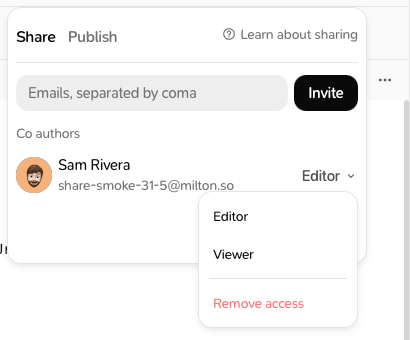
  1. Open the project and click Share.
  2. On the person’s row, click their role (for example Editor).
  3. Choose Editor or Viewer.
The role menu on a member's row: Editor, Viewer and Remove access
The change takes effect straight away.

Remove someone

  1. Open the project and click Share.
  2. On the person’s row, click their role.
  3. Choose Remove access.
Milton confirms with “email no longer has access.” The person stops receiving updates within seconds and can no longer edit. They keep the references and materials they had already received, and what they added stays in the project.
To stop sharing a project with everyone, remove each member this way.
Invitation links keep workingAn invitation link you sent (copy link) stays valid after you remove someone. Anyone who still has it, including a person you removed, can use it to join again. Only send the link to people you trust.
Last modified on November 21, 2026